


Router Bit Guides
Router Bit Speed Chart: RPM, Feed Rate and Burn Mark Fixes
Router bit speed is one of the fastest ways to improve cut quality. If the RPM is too high for the bit diameter, the edge can overheat, chatter or become unsafe. If the feed rate is too slow, the bit rubs instead of cutting and leaves dark burn marks. This article focuses only on router bit RPM, feed rate and burn-mark prevention, so it does not compete with broader router bit type guides.
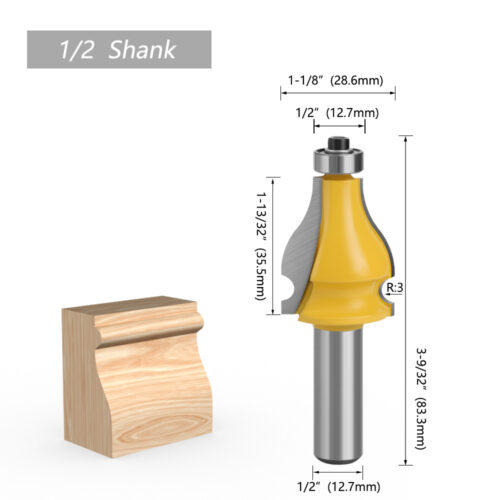
Quick Router Bit Speed Chart
Use the chart below as a practical starting point. Always stay within the maximum RPM marked by the bit maker and the router manufacturer. Larger diameter bits should run slower because the cutting edge travels faster at the outside rim.
| Router bit diameter | Starting RPM range | Common examples | Setup note |
|---|---|---|---|
| Up to 1/2 inch | 20,000 to 24,000 RPM | Small straight bits, trim bits, small roundovers | Good for small profiles and shallow passes |
| 1/2 to 1 inch | 18,000 to 22,000 RPM | Flush trim bits, common roundover and chamfer bits | Adjust down if the wood burns or the cut chatters |
| 1 to 1-1/2 inches | 16,000 to 18,000 RPM | Rabbeting bits, medium edge profiles, pattern bits | Use steady feed and avoid heavy full-depth passes |
| 1-1/2 to 2 inches | 12,000 to 16,000 RPM | Larger ogee, cove, bevel and joinery cutters | Router table support is usually better |
| 2 to 2-1/2 inches | 10,000 to 14,000 RPM | Large profile bits, some panel and rail cutters | Make multiple passes and use featherboards |
| Over 2-1/2 inches | 8,000 to 12,000 RPM | Raised panel bits and large diameter cutters | Use only with a router and bit rated for the diameter |
Why Larger Router Bits Need Lower RPM
RPM is the number of revolutions per minute, but the cutting edge speed also depends on diameter. A small bit and a large bit can spin at the same RPM, yet the outside edge of the large bit travels much faster. That higher rim speed creates more heat and more cutting force. This is why large profile bits should not be run at the same speed as small trim bits.
In machining terms, cutting speed is related to the outside diameter of the cutter. Wood routing is more forgiving than metal machining, but the same principle still matters: larger diameter means more surface speed at the cutting edge. When the bit gets larger, reduce RPM and take lighter passes.
RPM Is Only Half the Answer: Feed Rate Matters
Feed rate is how fast the work moves past the bit, or how fast the handheld router moves along the work. A good feed rate lets the cutter make chips. A poor feed rate makes the bit rub, heat up and polish the wood surface until it burns.
| What you see | Likely feed/speed issue | What to change first |
|---|---|---|
| Dark burn line along the edge | RPM too high, feed too slow, dull bit or resin buildup | Clean the bit, feed slightly faster or reduce RPM |
| Chatter marks or washboard surface | Cut too heavy, bit extended too far, setup not rigid | Take a lighter pass and support the work better |
| Router motor slows heavily | Feed too fast or cut too deep | Slow the feed and make multiple passes |
| Fuzzy edge or torn grain | Wrong feed direction, dull bit or unsupported grain | Use backing board, a sharp bit and a lighter finishing pass |
| Fine dust instead of chips | Bit is rubbing more than cutting | Increase feed slightly or check sharpness |
How to Set Router Speed in Real Work
- Measure the widest cutting diameter of the bit, not only the shank.
- Check the bit maker’s maximum RPM if it is available.
- Set the router near the lower-middle of the recommended range for that diameter.
- Make a test cut in scrap from the same wood or panel material.
- Look at the chips, the surface finish and the sound of the router.
- Adjust one thing at a time: RPM, feed rate or pass depth.
Do not solve every problem by increasing RPM. Faster is not automatically cleaner. If the bit is already hot or the wood is burning, more speed can make the problem worse.
Burn Marks: Causes and Fixes
Burn marks usually happen when heat builds up faster than the cut can clear it. The common causes are a dirty bit, a dull cutting edge, slow feed, high RPM, too much material in one pass or wood species that burns easily. Maple and cherry, for example, can show burn marks quickly if the bit pauses in one place.
| Cause | Why it burns | Fix |
|---|---|---|
| Dirty router bit | Pitch and resin insulate the cutting edge and increase friction | Clean the bit before changing settings |
| Dull carbide edge | The bit rubs instead of slicing fibers cleanly | Replace or sharpen the bit |
| Feed too slow | The cutter stays in contact too long | Feed smoothly and avoid pausing |
| RPM too high | Surface speed and heat increase | Reduce speed, especially on large bits |
| Pass too deep | The bit works too hard and traps chips | Make two or three lighter passes |
| Poor chip clearing | Dust packs into the cut and rubs against the edge | Use dust collection and clear chips between passes |
Router Table Speed Tips
Router tables are excellent for larger profile bits because the fence, featherboards and table surface support the work. They also make feed rate more consistent. For large diameter bits, keep the RPM lower, expose only the amount of cutter needed and take several passes. A final light pass often removes small burn marks and leaves a cleaner profile.
Handheld Router Speed Tips
With a handheld router, the operator controls feed rate by feel. Move steadily and keep the base flat. If the router pulls, the cut may be too aggressive or the feed direction may be wrong. If you pause at the end of a cut, the bit can burn that spot quickly. When routing end grain, take a light climb-cut scoring pass only if you can control the router safely, then finish with the normal feed direction.
Bit Type Changes the Best Speed
Diameter is the first speed factor, but bit design also matters. Straight bits and spiral bits clear chips differently. Flush trim bits with long cutting edges can generate heat along the full cutting length. Large decorative bits remove more material and should be slowed down. Raised panel bits need router table support, low speed and multiple passes.
| Bit or cut | Speed approach | Feed approach |
|---|---|---|
| Small straight bit | Higher RPM range is usually acceptable | Steady feed, avoid deep single passes |
| Flush trim bit | Moderate RPM; reduce if bearing or edge heats up | Rough-cut close to template first |
| Roundover or chamfer bit | Match RPM to diameter | Use one roughing pass and one light finishing pass if needed |
| Large ogee or cove bit | Lower RPM | Router table and multiple passes preferred |
| Raised panel bit | Low RPM within maker rating | Several shallow passes with strong work support |
| Spiral bit in CNC routing | Follow chip-load guidance where available | Cut chips, not powder; adjust feed and depth together |
Safety Checks Before Changing Speed
- Confirm the shank is fully gripped by the correct collet size.
- Do not bottom the bit shank hard against the inside of the collet.
- Use the lowest safe RPM for very large diameter bits.
- Make sure the bit, router and router table are all rated for the cut.
- Do not use cracked, bent, loose or damaged bits.
- Wear eye and hearing protection, and keep hands away from the cutter path.
FAQ
What RPM should I use for a 1/2 inch router bit?
For many 1/2 inch diameter router bits, 18,000 to 24,000 RPM is a practical starting range. Reduce speed if the cut burns, the bit is large for its shank, or the bit maker specifies a lower maximum.
What speed should I use for a 2 inch router bit?
A 2 inch router bit usually needs a slower range, often around 12,000 to 16,000 RPM depending on the bit design and manufacturer rating. Use a router table, light passes and firm work support.
Does slower router speed stop burn marks?
Sometimes, but not always. Burn marks can also come from slow feed, resin buildup, dull carbide or too much cut depth. Clean the bit and test feed rate before changing many settings at once.
Should I feed faster or slower when routing?
Feed fast enough that the bit cuts chips instead of rubbing, but not so fast that the router bogs down or chatters. The right feed rate depends on wood species, bit sharpness, cut depth and router power.
Why does my router chatter?
Chatter often comes from excessive cut depth, a loose setup, too much bit extension, an undersized shank for a large profile, or RPM that is not matched to the bit diameter. Take lighter passes and improve support.
Bottom Line
Router bit speed is not a single number. Start with bit diameter, stay inside the manufacturer’s rating, then tune the feed rate and pass depth by testing on scrap. Clean chips, a steady sound and a cool cutting edge usually mean the setup is close. Burn marks, chatter and dust are signs that the bit is rubbing, overheating or working too hard.
